In my part of Krefeld, the internet infrastructure still relies on DSL technology. No matter how much I pay my provider, they cannot give me more than 16Mbps because the physical wires can’t go faster.
For a normal home, this might be okay (I doubt it!!!). But for a home lab, it is a nightmare. To use VMware Cloud Foundation (VCF) 9.0, you must download files that are hundreds of gigabytes big. At my home speed, these downloads take days and often fail or time out.
To fix this, I created a “Portable Offline Depot” using Docker on my Mac. I can download everything at my office (where the internet is fast) and then bring my Mac home to my lab.
Instead of following the long manual steps in the official Broadcom documentation, I decided to automate the process. Since I am playing with containers to learn how they work, I built a setup that runs the depot inside Docker on my Apple M2 Mac. This makes the depot completely portable. I can use it now, or easily move the entire depot to another location later. By using Docker, I turned a complex manual task into a simple, automated system.
The Architecture
Because I use an Apple M2 Mac (ARM architecture) and the Broadcom tools are made for Intel (x86), I used two different containers working together:
- The Downloader: A Linux container forced to run in “Intel mode” so the Broadcom Download Tool works.
- The Web Server: A native Mac container running Apache to serve the files to my lab via HTTPS.
Both containers share a local folder on the Mac to store the binaries. This ensures the data stays on my physical disk even if the containers are deleted.
Step 1: Prepare the Folders
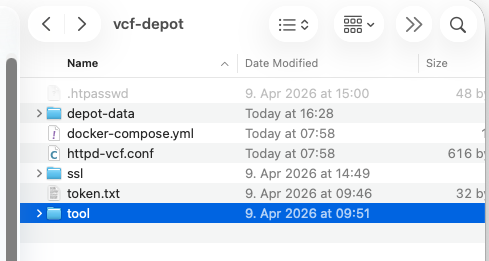
Create a main folder called vcf-depot on your Mac. Inside this folder, create the following structures:
depot-data/ : Where the VCF files will live.tool/: Put the unzipped VCF Download Tool here. You can download it from the Broadcom support portal.ssl/: For your security certificatestoken.txt: Your download token. You can generate and get your Download Token from the Broadcom support portal.
Create a User and Password
To enable basic authentication, make sure you are inside the vcf-depot main folder and run this command to create a .htpasswd file for the user vcfadmin with password.
docker run --rm httpd:alpine htpasswd -nb vcfadmin 'VMware123!' > .htpasswdCreate Certificates (SSL)
The VCF Installer requires HTTPS. To avoid certificate errors, you must add your FQDN and IP address to the Subject Alternative Name (SAN) field. Run this inside your vcf-depot/ssl/ directory:
openssl req -x509 -nodes -days 365 -newkey rsa:2048 \
  -keyout server.key \
  -out server.crt \
  -subj "/C=US/ST=Lab/L=Home/O=VCF/OU=Lab/CN=depot.lab.internal" \
  -addext "subjectAltName = DNS:depot.lab.internal, IP:192.168.114.64, IP:127.0.0.1"
Step 2: Docker Compose Configuration
The docker-compose.yml file handles the orchestration and ensures the downloader runs in the correct architecture mode.
services:
  vcf-downloader:
    platform: linux/amd64
    image: debian:bullseye-slim
    container_name: vcf-downloader
    volumes:
      - ${PWD}/depot-data:/var/www/html
      - ${PWD}/tool:/vcf-tool
      - ${PWD}/token.txt:/token.txt
    tty: true
    stdin_open: true

  vcf-server:
    image: httpd:alpine
    container_name: vcf-web-server
    ports:
      - "80:80"
      - "443:443"
    volumes:
      - ${PWD}/depot-data:/usr/local/apache2/htdocs/
      - ${PWD}/ssl/server.crt:/usr/local/apache2/conf/server.crt
      - ${PWD}/ssl/server.key:/usr/local/apache2/conf/server.key
      - ${PWD}/.htpasswd:/usr/local/apache2/conf/.htpasswd
      - ${PWD}/httpd-vcf.conf:/usr/local/apache2/conf/extra/httpd-vcf.conf
    command: >
      sh -c "sed -i 's|#LoadModule ssl_module|LoadModule ssl_module|' /usr/local/apache2/conf/httpd.conf &&
             sed -i 's|#LoadModule socache_shmcb_module|LoadModule socache_shmcb_module|' /usr/local/apache2/conf/httpd.conf &&
             echo 'Include conf/extra/httpd-vcf.conf' >> /usr/local/apache2/conf/httpd.conf &&
             httpd-foreground"
    restart: always
Step 3: Apache Configuration
The VCF Installer requires HTTPS and often expects specific TLS versions. This configuration enables TLS 1.2 and enforces Basic Authentication.
Listen 443
<VirtualHost *:443>
    DocumentRoot "/usr/local/apache2/htdocs"
    ServerName depot.lab.internal

    SSLEngine on
    SSLCertificateFile "/usr/local/apache2/conf/server.crt"
    SSLCertificateKeyFile "/usr/local/apache2/conf/server.key"

    # Support TLS 1.2 for VCF appliance compatibility
    SSLProtocol all -SSLv3 -TLSv1 -TLSv1.1
    SSLCipherSuite HIGH:!aNULL:!MD5:!3DES

    <Directory "/usr/local/apache2/htdocs/PROD">
        AuthType Basic
        AuthName "VCF Offline Depot"
        AuthUserFile "/usr/local/apache2/conf/.htpasswd"
        Require valid-user
    </Directory>
</VirtualHost>
Your folder should look like this at the end of these steps.
My Plan!
At Work: Start the containers and use the vcf-downloader to pull the binaries.
docker-compose up -dEnter the container:
docker exec -it vcf-downloader bashStart the download:
cd /vcf-tool
./bin/vcf-download-tool binaries download \
--depot-store /var/www/html \
--depot-download-token-file /token.txt \
--vcf-version 9.0.0.0 \
--sku VCF \
--automated-install \
--type INSTALL
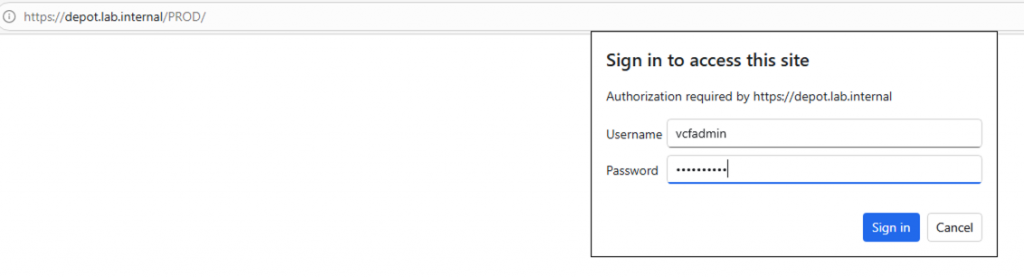
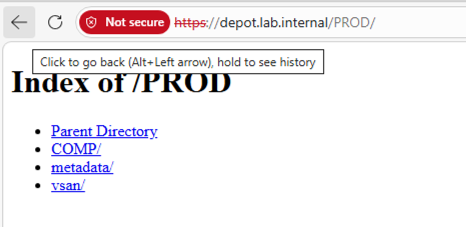
You can find the full VCF Download Tool reference here. As you can see depot is working and asking for credentials to authentication.
At Home: Connect the Mac to the lab network. Crucial Step: Since we use HTTPS, copy your server.crt to the VCF Installer appliance and import it using the keytool command we found:
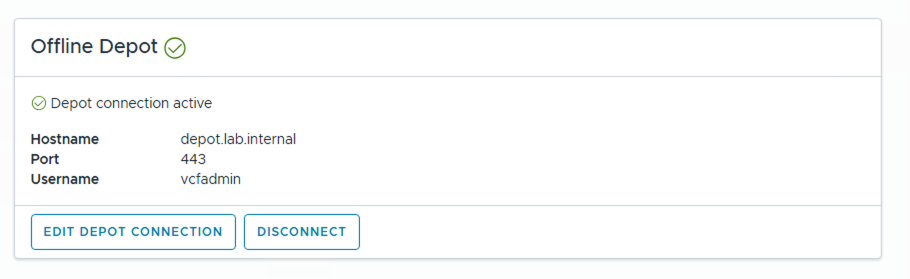
keytool -importcert -alias vcf-depot -file /tmp/server.crt -keystore /usr/lib/jvm/openjdk-java17-headless.x86_64/lib/security/cacerts -storepass changeitFinally, point the VCF Installer to https://<Mac-IP>/ and use your vcfadmin credentials.
Results
This setup removes the need for high-speed internet in the lab. Because it is containerized, I can move the vcf-depot folder to any machine with Docker and have a working depot in minutes.
Instead of struggling with a 16Mbps, the deployment pulls files at internal network speeds (1Gbps+). Building a VCF 9.0 home lab is now much easier!
Tips!
- SSL & DNS: I use my Mac’s home IP address to generate the SSL certificate. This avoids a Hostname/IP Mismatch. Make sure to add a DNS A-record (or edit your hosts file) so
depot.lab.internalresolves to your Mac’s IP. - Java Path: If the
keytoolcommand fails, runfind /usr/lib/jvm -name cacertsto find the exact path for your version of VCF installer.